

Moovar Lab · version 1.2.1
Wobbi. A hanging charm for Windows.
A little keychain on a real swinging cord. Free from the lab. No account. No ads.
Free · Windows 10 and 11
Hang it. Flick it. Get back to work.
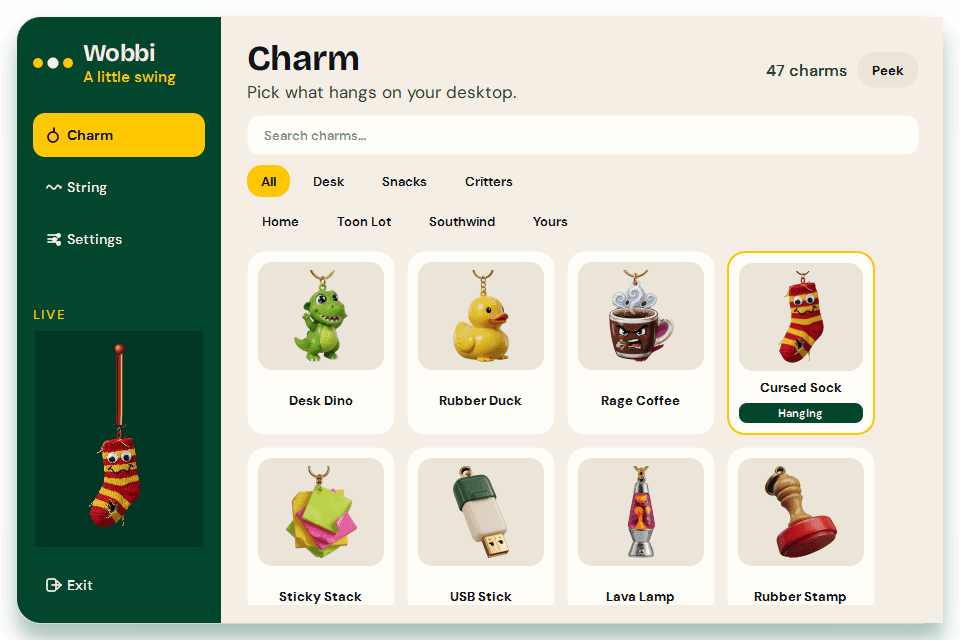
A little keychain that hangs from the top of your screen. Drag it. Flick it. It swings back and stays out of the way.
47 original charms, ten cords, dual screens, and a quiet idle sway. Next update 25 Oct 2026: more charms, cleaner 3D, tighter UI.
Win 10/11 · unzip, then open Wobbi.exe · How to use.txt is in the folder

Install
How to put Wobbi on your PC
Step 01
Download the zip
Get Wobbi 1.2.1 with the yellow button. It is a zip, not a setup wizard.
Step 02
Unzip the folder
Right-click the zip → Extract All. Keep every file in that folder together. Do not run it from inside the zip.
Step 03
Open Wobbi.exe
Double-click Wobbi.exe. If Windows says it protected your PC, choose More info, then Run anyway. The app is unsigned because it is a free studio tool.
Step 04
Look at the top of your screen
The charm hangs from the top. Drag it to swing. Drag the little cap to move it. It works on a second monitor too.
Use
Once it is hanging
- Right-click the charm or the tray icon to open Charm, String, and Settings.
- Pick a charm. Hang your own PNG from Charm → Hang your own.
- Pulse, Clip-on, and Alive are optional in Settings.
- Hide with Ctrl+Shift+D, or Hide charm in the tray.
- Start with Windows lives in Settings.
- Quit from the tray. Delete the folder to remove it. Optional: delete %APPDATA%\Wobbi.
Full notes are in How to use.txt inside the zip. Back to the lab.
Next update
25 Oct 2026. Better UI, more charms, cleaner 3D.
Version 1.2.1 is the first public hang. In two weeks we ship a tighter editor, more original charms, and neater HD 3D art. Tell us what broke so that build is better.
Bugs and errors
Something odd?
Write what you did and what you saw. It goes to the studio inbox. We read these before the 25 Oct 2026 update.
Contact
Have an idea?
Let's build it.
Tell us what you're working on, what you need and where you'd like to go. We'll start with a conversation.